OpenLCR (beta)
Beta, testers wanted. Free replacement firmware for the FNIRSI LC1020E LCR meter: Auto for every test condition, a new display, sorting, matching, sweep, ESR meter and USB control.
Downloads
SHA-256 6c37811958867b855fd8916266af766653d7b5de0e2d486a332e7aa7dd135e34
Beta: testers wanted. OpenLCR 1.0.0 is an early-access release. So far it has been tested on one LC1020E, so expect rough edges. If you try it, please tell us how it went: your meter's stock firmware version, whether the install worked, readings compared with the stock firmware or another meter, and anything that looks wrong. Send it through the contact form. You can always go back to the stock firmware.
OpenLCR is a replacement firmware for the FNIRSI LC1020E handheld LCR meter. It runs on the meter's own hardware and replaces the stock firmware completely: the measurement, the screens, the settings and the USB connection. It measures inductance, capacitance, resistance and impedance at 100 Hz, 120 Hz, 1 kHz, 10 kHz and 100 kHz like the stock firmware, and adds a lot on top.
It installs with the meter's own update method (a USB drive), and you can go back to the stock firmware the same way at any time. It is free to download and use.
What it adds
- Auto for every test condition (frequency, level, DC bias, range, speed, circuit), each on its own, so the meter picks the right conditions for each part.
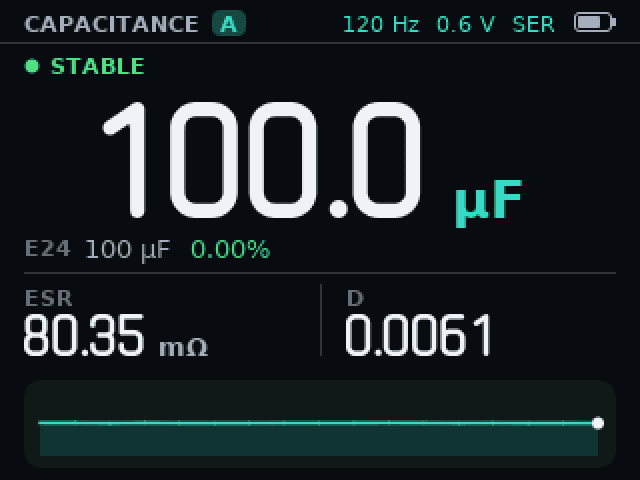
- A redesigned display with large anti-aliased digits, 11 digit styles, 14 colour themes (including Night and Sunlight) and a trend graph.
- Sorting with tolerance classes, part matching into pairs, triples or quads, a frequency sweep, an ESR meter for capacitors in circuit, a continuity tester that never beeps on a capacitor, and colour and SMD code tools.
- Trend history that keeps readings over 1 minute to 7 days, also across switch-off.
- Full calibration with open, short and up to four load resistors, checked while it is taken.
- USB serial port (no driver on Windows 10/11, macOS or Linux) with live readings and remote-control commands, or a USB drive with the recorded readings as a CSV file.
What stock has that OpenLCR does not: the Chinese language option. OpenLCR is in English only.
Supported hardware
| Meter | FNIRSI LC1020E only |
| MCU | Nations Technologies N32G455VEL7 (Cortex-M4F) |
| Tested stock firmware | V1.1 (20250702) |
| Installing | USB-C data cable and a PC (Windows, macOS or Linux) |
OpenLCR is not for other FNIRSI meters (for example the LCR-ST1 or LCR-P1). It was developed and tested on one LC1020E with stock firmware V1.1. A meter with a different board revision or MCU may not work; you can always go back to the stock firmware.
Download
openlcr-1.0.0.bin is the firmware, ready to copy to the meter. Its SHA-256 is shown under the download button.
Before you start
- Installing OpenLCR is at your own risk and may void the manufacturer's warranty. Go back to the stock firmware before a warranty claim.
- The meter's update loader (bootloader) sits in memory that neither the stock update nor OpenLCR can change. Whatever happens to the firmware, the update drive still appears, so you can always install again or go back to stock.
- The factory calibration stays on the meter. OpenLCR reads it and never erases it.
- Charge the battery or keep the meter on USB power while installing.
- Get a stock firmware file first, so you can go back later: the LC1020E firmware V1.1 from FNIRSI's website. If the update drive shows a .bin file, you can also copy it to your PC as a backup.
- Settings of the stock firmware (language, brightness, sorting limits) are not carried over.
Installing
- Check the file: its SHA-256 must match the one under the download button. On Windows:
certutil -hashfile openlcr-1.0.0.bin SHA256; on macOS or Linux:shasum -a 256 openlcr-1.0.0.bin. - Switch the meter off and connect it to the PC with the USB-C cable.
- Hold the UP key, then press POWER while you keep holding UP. The screen shows "BootLoader" (it may also stay blank) and a new USB drive appears on the PC. Release the keys once the drive is there.
- Copy
openlcr-1.0.0.binonto that drive and wait for the copy to finish. Do not unplug the cable or switch the meter off during the copy. - About a second after the copy, the meter restarts and switches itself off, and the drive disappears. This is normal.
- Switch the meter on: hold POWER until the bar under the name fills (about a second). OpenLCR starts.
If the copy is interrupted, nothing is lost: enter the update drive again (step 3) and copy the file again.
Checking the install
- The start screen shows the OpenLCR name and the meter opens on the measurement screen.
- OK opens the menu; Settings > System > About shows "OpenLCR" and
v1.0.0. - Over the serial port,
*IDN?answersFNIRSI,LC1020E,0,OpenLCR v1.0.0.
Then calibrate with the leads or fixture you use: Settings > Calibration > Guided calibration, at least the open and short steps.
Going back to stock
- Get the stock firmware: the LC1020E firmware V1.1 from FNIRSI's website, or your own backup from the update drive.
- Switch the meter off, hold UP and press POWER, as when installing.
- Copy the stock .bin onto the update drive and wait until the meter switches off.
- Switch the meter on.
The factory calibration is kept. On its first start the stock firmware may ask for the language and start with its default settings.
Using the meter
Keys on the measurement screen
| Key | Press | Hold |
|---|---|---|
| MODE | part type: Auto, R, C, L, Z | back to Auto |
| FREQ | test frequency: Auto, 100 Hz, 120 Hz, 1 kHz, 10 kHz, 100 kHz | |
| LEVEL | test level: Auto, 0.1 V, 0.3 V, 0.6 V (0.6 V not with the bias on) | |
| OFFSET | DC bias: Auto, off, 0.5 V | |
| RANGE | Auto, or lock the 100 Ω, 1 kΩ, 10 kΩ or 100 kΩ range | |
| SPEED | Auto, Precise, Slow, Medium, Fast | circuit: Auto, series, parallel |
| SEC | secondary value: Auto, ESR, D, Q, phase angle, X | |
| HOLD | freeze the reading | Sorting screen |
| LEFT / RIGHT | open the conditions strip, then move along it | |
| UP / DOWN | open the conditions strip, then change the tile in the middle | repeats |
| OK | close the strip, else open the menu | |
| POWER | close the strip, else go back | switch off |
In the menu and in lists: UP and DOWN select, LEFT and RIGHT change a value, OK opens or starts, POWER goes back.
Measurement screen
- Top bar: the part type (with an A when picked automatically), the test conditions in use and the battery. A condition picked by Auto shows in the accent colour.
- Status line: STABLE, SETTLING, CHARGING, OPEN, SHORT, OVERLOAD, NO SIGNAL, HOLD, LAST READING, PASS or FAIL, with chips for active modes. A bar under the digits fills while the reading settles.
- Main reading: L, C, R or |Z|. With Nearest standard on, the nearest E12, E24 or E96 value and the deviation from it show under it.
- Secondary values: two more quantities, for example ESR and D for a capacitor.
- Trend ribbon: the readings of the part on the leads, or of a time span.
Connect the part and wait for STABLE. Discharge capacitors before connecting them, and never measure in a powered circuit.
Conditions strip and Auto
An arrow key on the measurement screen slides up the conditions as tiles: FREQ, LEVEL, DC BIAS, RANGE, SPEED, CIRCUIT, BRIGHTNESS, STATISTICS, TREND and RELATIVE. LEFT and RIGHT move along them, UP and DOWN change the tile in the middle. The strip slides away 3.5 s after the last key, or on OK or POWER.
Every condition can be on Auto or set by hand, each on its own. Auto frequency picks the frequency that suits the part's impedance; Auto level uses the highest level the bias allows and steps down when a part distorts the signal; Auto bias switches the 0.5 V bias on for capacitors from a set value up (10 µF to start with); Auto speed averages as long as the reading's own scatter needs. Settings > Measurement > All on Auto puts everything back on Auto in one step.
Relative (on the strip) zeroes on the reading on screen and shows the deviation in percent. Statistics shows the minimum, average and maximum since it was switched on.
Tools
Sorting
Menu > Sorting, or hold HOLD. Set the nominal value (typed, or taken from a reference part), the tolerance or the low and high limits. Each part is judged once, on its first stable reading: one beep and the green LED for pass, two beeps and the red LED for fail. The screen shows the deviation, the pass and fail counts and the tightest tolerance class the part meets (1, 2, 5, 10, 20 %).
Matching
Menu > Matching. Put parts in the clips one after another; each is numbered and kept, up to 60. The batch is grouped into pairs, triples or quads whose values agree within the set tolerance (0.1 to 5 %).
Trend
Menu > Trend. Settled readings over 1 min, 10 min, 1 h, 6 h, 24 h or 7 days, with a cursor and the minimum, average, maximum, spread and drift. Spans of an hour and longer are kept over a switch-off.
Frequency sweep
Menu > Sweep. Measures the part at all five frequencies in one go, as a table or a graph of |Z| and phase. Each sweep is also sent over the serial port as CSV.
ESR meter
Menu > ESR meter. ESR of capacitors, also in circuit, at 100 kHz and 0.1 V (low enough not to turn on semiconductor junctions), on a scale from 0.01 to 100 Ω, plus C and D at 120 Hz. Discharge the capacitor and switch the circuit off first.
Continuity and code tools
- Continuity: beeps within a few milliseconds below a set threshold (1 to 1000 Ω), never on a capacitor, charged or not.
- Color code for resistors and inductors (4, 5 or 6 bands) and a colour table.
- SMD resistor, capacitor and inductor codes (including EIA-96), read both ways and compared with the part on the leads.
- Two parts: two measured parts in series or parallel, as an RC or RL time constant or an LC resonance.
Setups
Menu > Setups. Four slots keep the test conditions, part type, secondary and sorting window, and recall them in one step.
Calibration
Settings > Calibration. Calibrate with the leads or fixture you measure with:
- Guided calibration walks through Open (leads apart), Short (leads together) and up to four load resistors (0.1 Ω to 10 MΩ, values you enter). Any load step can be skipped.
- A step that does not look like an open, a short or the entered resistor is refused, and the previous calibration is kept.
- Where no load is calibrated, the meter's own factory calibration is used, as in stock. Clear calibration removes OpenLCR's calibration; the factory calibration stays.
PC connection
Settings > Data > USB-C mode selects what the port is:
- Serial port (default), no driver needed. Any serial terminal or program can send commands, one per line, for example
*IDN?,READ?,MEAS:STAB?,FREQ 10k,LEV 0.3,FUNC C,AUTO:ALL,KEY OK.?lists every command. - USB drive: a read-only drive with the recorded readings in
LOG.CSV.
Stream readings sends every reading as a CSV row. Record readings keeps the settled readings (about 280) in the meter's memory, also over a switch-off.
Settings
- Measurement: frequency, circuit, secondary, range, speed, drive level, DC bias, Auto bias from (1 µF to 1 mF), All on Auto, Keep last reading, Nearest standard (E12, E24, E96), status LED.
- Display: theme, digit style, number of digits, single or dual layout, secondaries, trend style and span, conditions in the top bar, brightness.
- Sound: beeper, key click, volume.
- Power: auto power off (default 15 min) and dim when idle (default 1 min). Measuring counts as use, and a card counts down the last 10 seconds before switch-off.
- Data: record readings, log, clear log, clear trend, stream readings, USB-C mode.
- System: About, Keys, Diagnostics, Calibration memory and Restore settings (defaults; the calibration is kept).
Troubleshooting
| Problem | What to do |
|---|---|
| No USB drive appears | Use a cable that carries data, not a charge-only one. Switch the meter off, hold UP before and while pressing POWER, and keep holding UP until the drive appears. Try another USB port. |
| The meter stays off after the copy | Normal: the update ends with the meter off. Hold POWER for about a second. |
| The meter starts in the update drive every time | The firmware is missing or incomplete, for example after an interrupted copy. Copy the .bin onto the drive again. |
| It does not switch on with a short press | Hold POWER until the bar under the name fills, about a second. |
| Readings drift or are offset with your leads | Calibrate with those leads: Guided calibration, at least Open and Short. |
| CHARGING shows for a while | A capacitor is charging (large capacitors, or with the DC bias). The reading follows. |
| OPEN with a part connected | The impedance is above what the frequency can measure (about 11 MΩ up to 1 kHz, 1.1 MΩ at 10 kHz, 110 kΩ at 100 kHz). Use a lower frequency or Auto. |
| OVERLOAD with a locked range | The part is outside the locked range; set RANGE to Auto. |
| No serial port on the PC | USB-C mode must be Serial port, and the cable must carry data. |
| Strange settings after an update | Settings > System > Restore settings sets the defaults and keeps the calibration. |
Measurement limits
- Test frequencies 100 Hz, 120 Hz, 1 kHz, 10 kHz, 100 kHz; levels 0.1 V, 0.3 V, 0.6 V; DC bias 0.5 V.
- Highest measurable |Z|: about 11 MΩ at 100 Hz to 1 kHz, 1.1 MΩ at 10 kHz, 110 kΩ at 100 kHz; above that the meter shows OPEN.
- The accuracy is the meter's own and depends on the calibration and the leads. OpenLCR is not a calibrated instrument and makes no accuracy claim.
Source code
The source code is coming. For now OpenLCR is released as a ready-to-flash binary; the source will be published later under the same MIT license. With the source release, the USB serial port also gets OpenLCR's own USB ID in place of the generic one it uses now.
License
OpenLCR is free for any use, including commercial use, under the MIT license below. It is provided as is, without warranty of any kind. Copyright (c) 2026 Jan Kos.
OpenLCR is not affiliated with, endorsed by or supported by FNIRSI. FNIRSI and LC1020E are names of their owner and are used here only to name the hardware OpenLCR runs on. Installing OpenLCR may void the manufacturer's warranty; go back to the stock firmware before a warranty claim.
The firmware contains glyphs of the DejaVu Sans font, under the license below.
MIT license
MIT License

Copyright (c) 2026 Jan Kos

Permission is hereby granted, free of charge, to any person obtaining a copy
of this software and associated documentation files (the "Software"), to deal
in the Software without restriction, including without limitation the rights
to use, copy, modify, merge, publish, distribute, sublicense, and/or sell
copies of the Software, and to permit persons to whom the Software is
furnished to do so, subject to the following conditions:

The above copyright notice and this permission notice shall be included in all
copies or substantial portions of the Software.

THE SOFTWARE IS PROVIDED "AS IS", WITHOUT WARRANTY OF ANY KIND, EXPRESS OR
IMPLIED, INCLUDING BUT NOT LIMITED TO THE WARRANTIES OF MERCHANTABILITY,
FITNESS FOR A PARTICULAR PURPOSE AND NONINFRINGEMENT. IN NO EVENT SHALL THE
AUTHORS OR COPYRIGHT HOLDERS BE LIABLE FOR ANY CLAIM, DAMAGES OR OTHER
LIABILITY, WHETHER IN AN ACTION OF CONTRACT, TORT OR OTHERWISE, ARISING FROM,
OUT OF OR IN CONNECTION WITH THE SOFTWARE OR THE USE OR OTHER DEALINGS IN THE
SOFTWARE.
Font license (DejaVu Sans)
OpenLCR - third-party notices

The OpenLCR firmware image contains glyphs rasterized from the DejaVu Sans and DejaVu Sans
Bold fonts. Their license follows.

--------------------------------------------------------------------------------

Fonts are (c) Bitstream (see below). DejaVu changes are in public domain.
Glyphs imported from Arev fonts are (c) Tavmjong Bah (see below)

Bitstream Vera Fonts Copyright
------------------------------

Copyright (c) 2003 by Bitstream, Inc. All Rights Reserved. Bitstream Vera is
a trademark of Bitstream, Inc.

Permission is hereby granted, free of charge, to any person obtaining a copy
of the fonts accompanying this license ("Fonts") and associated
documentation files (the "Font Software"), to reproduce and distribute the
Font Software, including without limitation the rights to use, copy, merge,
publish, distribute, and/or sell copies of the Font Software, and to permit
persons to whom the Font Software is furnished to do so, subject to the
following conditions:

The above copyright and trademark notices and this permission notice shall
be included in all copies of one or more of the Font Software typefaces.

The Font Software may be modified, altered, or added to, and in particular
the designs of glyphs or characters in the Fonts may be modified and
additional glyphs or characters may be added to the Fonts, only if the fonts
are renamed to names not containing either the words "Bitstream" or the word
"Vera".

This License becomes null and void to the extent applicable to Fonts or Font
Software that has been modified and is distributed under the "Bitstream
Vera" names.

The Font Software may be sold as part of a larger software package but no
copy of one or more of the Font Software typefaces may be sold by itself.

THE FONT SOFTWARE IS PROVIDED "AS IS", WITHOUT WARRANTY OF ANY KIND, EXPRESS
OR IMPLIED, INCLUDING BUT NOT LIMITED TO ANY WARRANTIES OF MERCHANTABILITY,
FITNESS FOR A PARTICULAR PURPOSE AND NONINFRINGEMENT OF COPYRIGHT, PATENT,
TRADEMARK, OR OTHER RIGHT. IN NO EVENT SHALL BITSTREAM OR THE GNOME
FOUNDATION BE LIABLE FOR ANY CLAIM, DAMAGES OR OTHER LIABILITY, INCLUDING
ANY GENERAL, SPECIAL, INDIRECT, INCIDENTAL, OR CONSEQUENTIAL DAMAGES,
WHETHER IN AN ACTION OF CONTRACT, TORT OR OTHERWISE, ARISING FROM, OUT OF
THE USE OR INABILITY TO USE THE FONT SOFTWARE OR FROM OTHER DEALINGS IN THE
FONT SOFTWARE.

Except as contained in this notice, the names of Gnome, the Gnome
Foundation, and Bitstream Inc., shall not be used in advertising or
otherwise to promote the sale, use or other dealings in this Font Software
without prior written authorization from the Gnome Foundation or Bitstream
Inc., respectively. For further information, contact: fonts at gnome dot
org.

Arev Fonts Copyright
------------------------------

Copyright (c) 2006 by Tavmjong Bah. All Rights Reserved.

Permission is hereby granted, free of charge, to any person obtaining
a copy of the fonts accompanying this license ("Fonts") and
associated documentation files (the "Font Software"), to reproduce
and distribute the modifications to the Bitstream Vera Font Software,
including without limitation the rights to use, copy, merge, publish,
distribute, and/or sell copies of the Font Software, and to permit
persons to whom the Font Software is furnished to do so, subject to
the following conditions:

The above copyright and trademark notices and this permission notice
shall be included in all copies of one or more of the Font Software
typefaces.

The Font Software may be modified, altered, or added to, and in
particular the designs of glyphs or characters in the Fonts may be
modified and additional glyphs or characters may be added to the
Fonts, only if the fonts are renamed to names not containing either
the words "Tavmjong Bah" or the word "Arev".

This License becomes null and void to the extent applicable to Fonts
or Font Software that has been modified and is distributed under the
"Tavmjong Bah Arev" names.

The Font Software may be sold as part of a larger software package but
no copy of one or more of the Font Software typefaces may be sold by
itself.

THE FONT SOFTWARE IS PROVIDED "AS IS", WITHOUT WARRANTY OF ANY KIND,
EXPRESS OR IMPLIED, INCLUDING BUT NOT LIMITED TO ANY WARRANTIES OF
MERCHANTABILITY, FITNESS FOR A PARTICULAR PURPOSE AND NONINFRINGEMENT
OF COPYRIGHT, PATENT, TRADEMARK, OR OTHER RIGHT. IN NO EVENT SHALL
TAVMJONG BAH BE LIABLE FOR ANY CLAIM, DAMAGES OR OTHER LIABILITY,
INCLUDING ANY GENERAL, SPECIAL, INDIRECT, INCIDENTAL, OR CONSEQUENTIAL
DAMAGES, WHETHER IN AN ACTION OF CONTRACT, TORT OR OTHERWISE, ARISING
FROM, OUT OF THE USE OR INABILITY TO USE THE FONT SOFTWARE OR FROM
OTHER DEALINGS IN THE FONT SOFTWARE.

Except as contained in this notice, the name of Tavmjong Bah shall not
be used in advertising or otherwise to promote the sale, use or other
dealings in this Font Software without prior written authorization
from Tavmjong Bah. For further information, contact: tavmjong @ free
. fr.

$Id: LICENSE 2133 2007-11-28 02:46:28Z lechimp $
More projects